
VR development is the work of designing and building virtual reality experiences — games, training apps, exhibitions, design reviews, education content, and more — so that users can perceive and interact with a three-dimensional virtual space. As headsets such as Meta Quest become common and projection-based VR expands in business settings, more companies are asking how to start a VR project, which software to use, what it costs, and whether to build in-house or outsource.
This guide explains VR development end to end for project owners and procurement teams: definitions and types, required tools and languages, a typical process, cost ranges, how to choose a development partner, and how Portalgraph approaches shared, display-based VR that does not force every visitor into a heavy headset.
What is VR Development?
VR (Virtual Reality) places users inside a computer-generated or 360° captured space. VR development covers the full stack around that experience:
- Experience design — goals, user journey, interaction rules, safety and comfort
- 3D / CG production — models, materials, animation, lighting, and sometimes photogrammetry or 360° video
- Software implementation — usually on Unity or Unreal Engine, plus device SDKs
- Device integration — HMD tracking, controllers, stereoscopic projection, sensors
- QA, deployment, and operation — performance, comfort, updates, and on-site support
Business VR is not limited to consumer games. Typical briefs include operator training, product visualization, museum and trade-show attractions, remote collaboration, and marketing campaigns. Related fields — AR (augmented reality), MR (mixed reality), and the umbrella term XR — often share the same engines and teams, so many “VR development” RFPs actually span the wider XR stack.
Main Types of VR Development
1. HMD / headset VR
Experiences for Meta Quest, PlayStation VR2, PC VR (SteamVR), and similar devices. Strong personal immersion; best when one user needs deep focus (gamesplay, individual training).
2. 360° video / photoreal walkthroughs
Captured or stitched spherical video and photo tours (property viewing, facility guides). Faster to produce than full interactive 3DCG, with less free interaction.
3. Simulation and training systems
Physics-heavy apps for construction machinery, medical procedures, disaster drills, and safety training. Often run on PC with gamepads or custom hardware, sometimes later extended to VR/HMD.
4. Projection / CAVE-style shared VR
Stereoscopic imagery on projectors, 3D TVs, LED walls, or monitors, often with lightweight stereo glasses. Multiple people can share the same space while still seeing the real room — ideal for exhibitions, classrooms, and design reviews. This is the lineage of CAVE VR and the focus of Portalgraph.
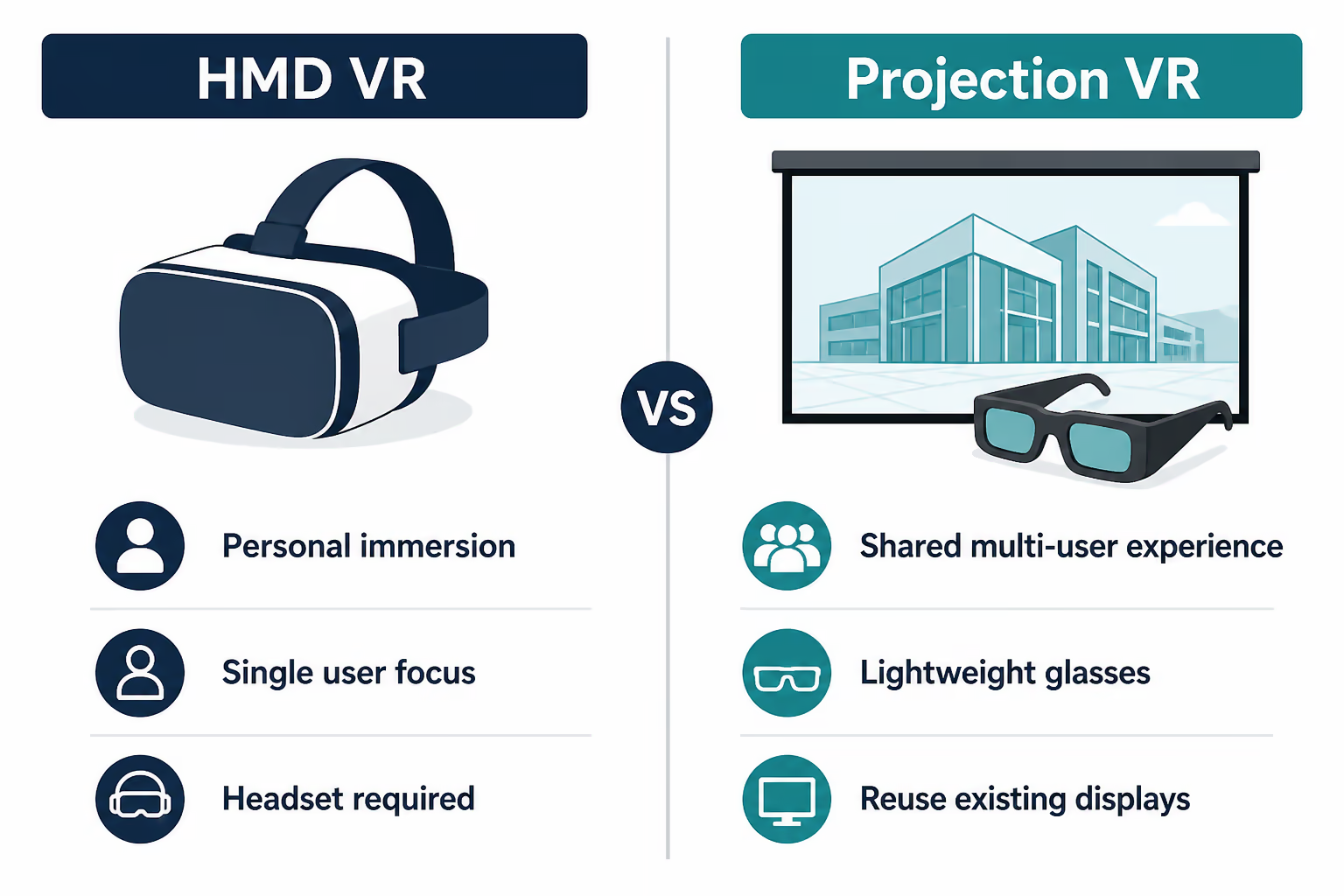
Figure 1. HMD VR vs projection VR — choose by audience size and venue constraints.
Software and Programming Languages for VR Development
Across industry rankings and tutorials, two engines dominate commercial VR work: Unity and Unreal Engine. Portalgraph is not a third engine — it is a Unity SDK / asset that turns Unity scenes into view-dependent stereoscopic projection experiences.
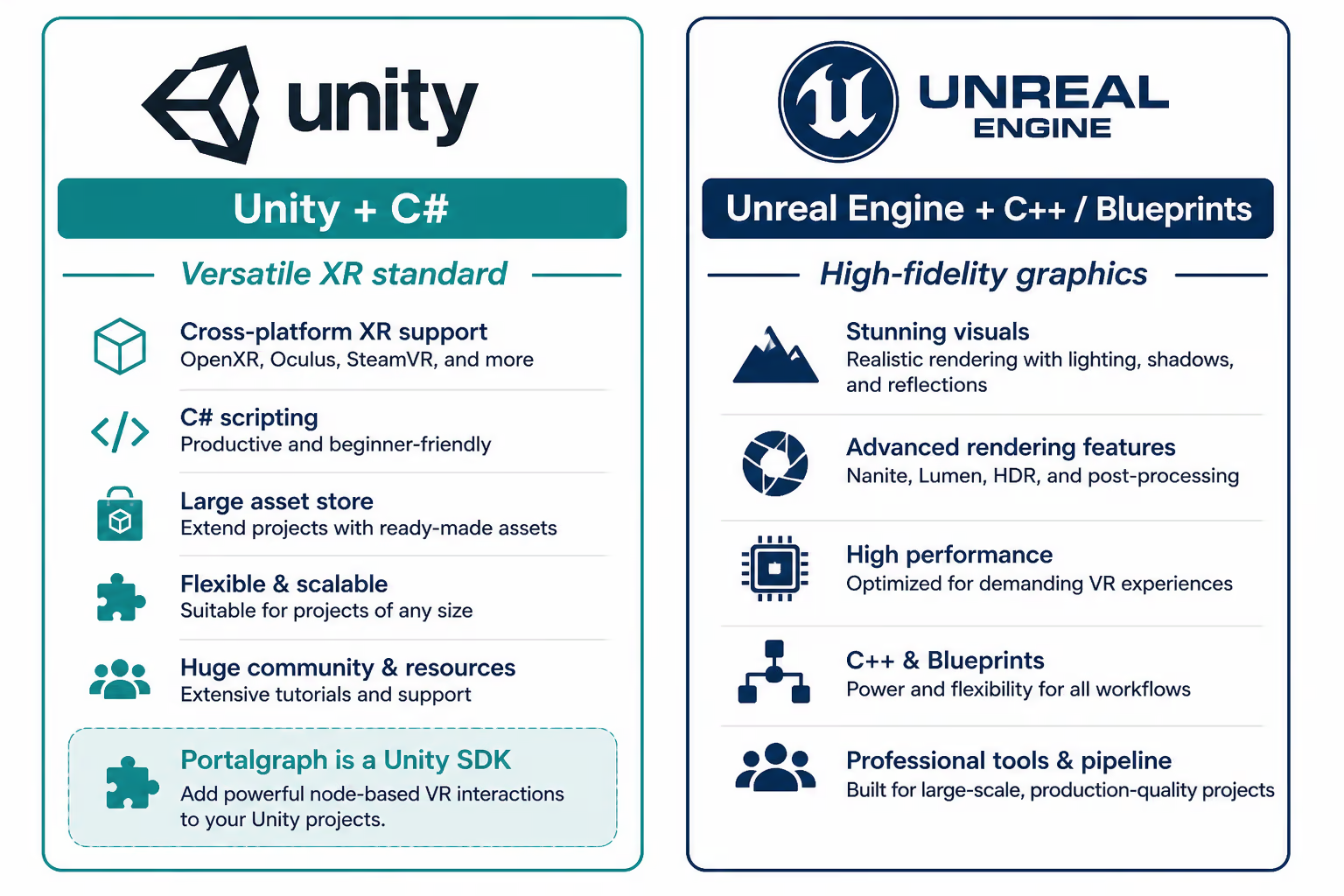
Figure 2. Main engines for VR development — Portalgraph runs on Unity.
Unity + C#
Unity is the most widely used platform for XR apps and business prototypes. Strengths include a large Asset Store, XR Interaction Toolkit, broad headset support, and relatively fast iteration. The primary language is C#. Portalgraph is provided as a Unity SDK (asset), so teams already building Unity scenes can add shared, display-based stereoscopic VR without switching engines.
Unreal Engine + C++ / Blueprints
Unreal Engine (Epic Games) is preferred when cinematic fidelity and high-end lighting matter — premium marketing films, high-spec simulators, AAA-style visuals. Logic can be written in C++ or assembled visually with Blueprints.
Other tools in the pipeline
- 3DCG — Blender, Maya, 3ds Max, Substance for assets
- Device / platform SDKs — Meta Horizon / OpenXR, SteamVR, and for projection VR on Unity: Portalgraph SDK
- Capture — 360° cameras, LiDAR, photogrammetry for real-world spaces
- Backend — accounts, analytics, content updates, sometimes cloud rendering
| Engine | Language / workflow | Best fit |
|---|---|---|
| Unity | C#, XR Toolkit, Portalgraph SDK (for projection) | Apps, training, exhibitions, multi-platform XR, shared projection VR |
| Unreal Engine | C++, Blueprints | High-fidelity visuals, cinematic experiences |
Choosing an engine (Unity vs Unreal) and choosing an experience format (HMD vs projection) are separate decisions. When Portalgraph is used for projection VR, it is a Unity SDK — so implementation happens in Unity with the Portalgraph SDK, not as a third engine beside Unity and Unreal.
A Practical VR Development Process
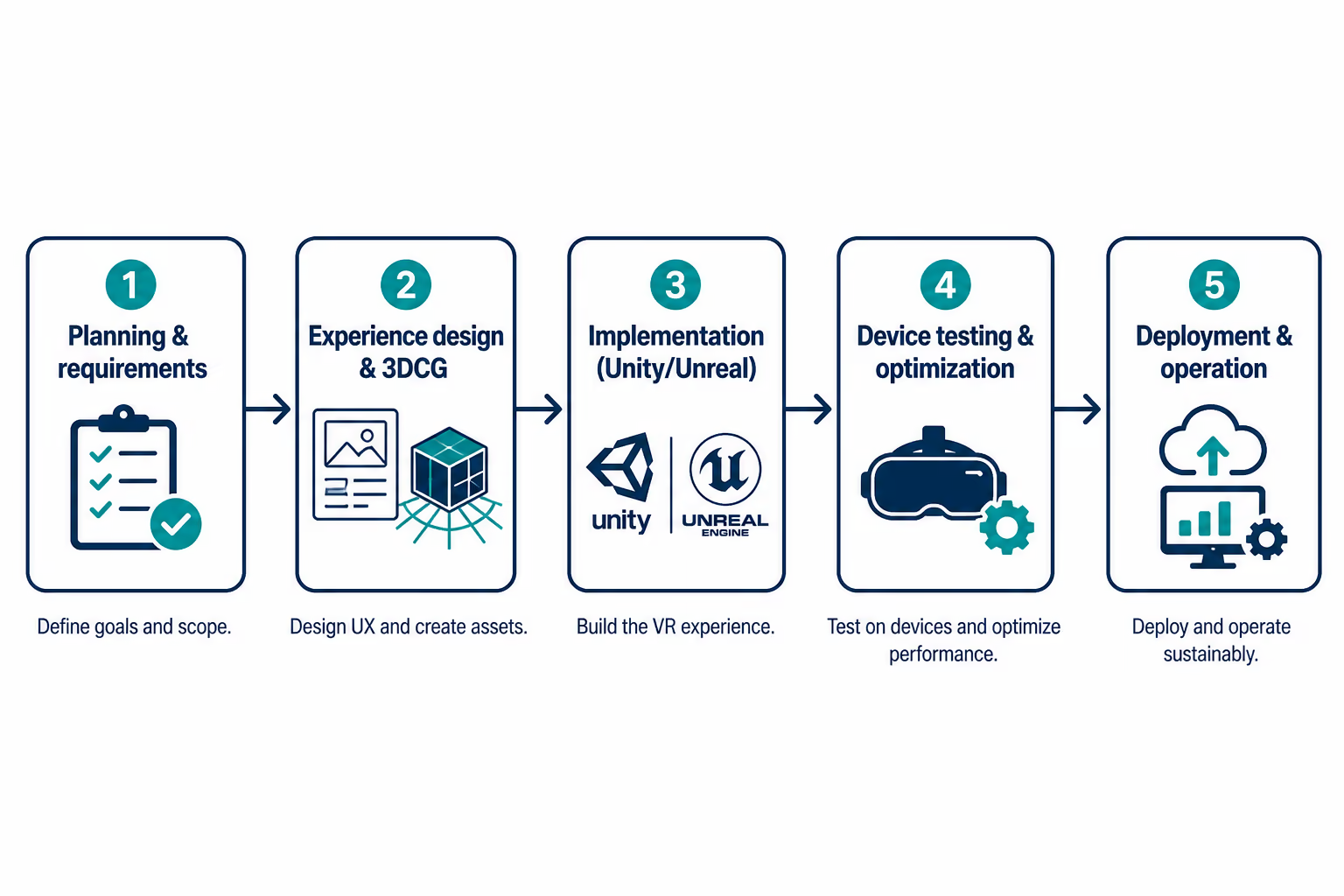
Figure 3. Typical five-step VR development flow.
- Planning and requirements — business goal (leads, training retention, understanding), target users, venue, devices, KPI, budget, schedule
- Experience design and 3DCG — storyboards, interaction prototypes, asset production, comfort rules (locomotion, disparity)
- Implementation — engine work, input, UI, stereo/HMD integration, content pipeline
- Device testing and optimization — frame rate, heat, sickness risk, accessibility, facilitator scripts for booths
- Deployment and operation — install, staff training, content updates, measurement, maintenance
Projects fail most often when step 1 is vague (“we just want VR”). Clarify whether the priority is personal immersion, group sharing, photorealism, or measurable training outcomes before locking the stack.
VR Development Cost Ranges (Guide)
Costs vary widely by interactivity, CG quality, device count, and whether custom hardware is required. The following are rough Japanese-market planning bands for business projects:
| Project type | Rough budget | Notes |
|---|---|---|
| Simple 360° / light interactive | From several hundred thousand JPY | Limited interaction, reuse of capture footage |
| Business app / exhibition content | From low-to-mid millions of JPY | Custom CG, Unity implementation, on-site tuning |
| Training simulator / complex system | Multi-million JPY and up | Physics, scoring, hardware I/O, long QA |
| Projection / multi-display venue | Depends on screens + content | Can reuse existing TVs/projectors; content still drives cost |
When comparing quotes, separate content production, software development, hardware, and operation. The cheapest bid is rarely the lowest total cost if booth staff cannot run the experience or visitors feel sick.
Business Use Cases
- Exhibitions and showrooms — attract aisle traffic and generate leads without isolating every visitor in an HMD
- Education and museums — shared spatial learning (history, science, architecture)
- Training and simulation — safe repetition of high-risk or expensive real-machine tasks
- Design and manufacturing review — life-size review of vehicles, buildings, and equipment
- Marketing and entertainment — branded experiences, live events, location-based attractions
In-House vs Outsourcing VR Development
Build in-house when you already have Unity/Unreal talent, will iterate for years, and own the IP roadmap. Outsource when you need speed, specialized stereoscopic or simulation know-how, or temporary surge capacity for a show deadline.
When evaluating a VR development company, check:
- Relevant case studies (same industry or same format: booth, classroom, simulator)
- Ability to advise on device and format (HMD vs projection vs hybrid), not only “we can code Unity”
- Comfort, safety, and facilitation design for real visitors
- Transparent scope: what is included in CG, engineering, install, and maintenance
- Communication quality during requirements — weak discovery predicts weak delivery
How Portalgraph Approaches VR Development
Portalgraph is a Unity SDK for VR projection: it opens a view-dependent stereoscopic space on everyday displays — projectors, 3D TVs, LED walls, and monitors. Visitors wear lightweight stereo glasses instead of a heavy headset, keep awareness of the physical room, and can experience the content together.
Portalgraph — shared stereoscopic VR on practical displays.
Because the stack is Unity-based, existing 3D scenes can often be adapted into projection VR. That matters for companies that already invested in digital twins, product CG, or educational assets and want a public-facing experience without rebuilding everything for a single HMD SKU.
Example projects
- HomemadeCAVE (Tokyo University of the Arts) — CAVE-like immersion with accessible equipment
- Manufacturing DX Expo booth (CCT) — stereoscopic Google Earth display that ranked #1 in booth lead generation
- Construction machinery simulator (ARAV) — Unity 6 training system for hydraulic excavators
- JAXA-related space visualization — spatial storytelling with projection VR
We support the full path from requirements and format selection through content development, on-site installation, and operation — including hybrid plans that combine HMD demos with shared projection for groups.
VR vs AR vs MR vs XR
- VR — replaces much of the visual field with a virtual space (headset or projection)
- AR — overlays digital content on the real world (phones, glasses)
- MR — stronger blending/interaction between real and virtual (definitions vary)
- XR — umbrella term for the family above
Misaligned vocabulary is a common cause of bad quotes. If you want a shared stereoscopic booth experience on a large screen, say so explicitly instead of only writing “VR app.” For AR basics, see What is AR?.
Pre-brief Checklist
- Business goal and success metric
- Audience, concurrent users, and staffing model
- Venue constraints (space, light, power, noise)
- Preferred devices and must-have interactions
- Existing assets (CAD, Unity scenes, 360 footage)
- Budget band, deadline, and maintenance window
Common Pitfalls
- Choosing a headset first, then discovering visitors will not wait in line
- Shipping a beautiful demo that staff cannot operate under show pressure
- Ignoring comfort (locomotion, disparity, latency)
- Comparing quotes without separating CG, software, hardware, and on-site support
FAQ
Q. Which is better for VR development, Unity or Unreal Engine?
A. Unity is usually the faster path for multi-platform business XR and exhibitions. Unreal Engine fits when maximum visual fidelity is the top priority. Portalgraph itself is a Unity SDK for projection VR — not an alternative engine to Unity or Unreal.
Q. Do we always need an HMD?
A. No. For group experiences, classrooms, and booths, projection VR with stereo glasses is often more practical. HMDs remain excellent for personal immersion and certain training tasks.
Q. Can non-programmers build VR?
A. Simple prototypes are possible with assets and visual scripting, but production-quality business VR still needs engineering for performance, interaction, and deployment.
Q. What should we prepare before requesting a quote?
A. Goal and KPI, target users, venue and visitor flow, must-have interactions, reference videos, budget band, and deadline. Even rough answers dramatically improve estimate accuracy.
Q. How is Portalgraph different from a typical VR app vendor?
A. Portalgraph is a Unity SDK for shared, view-dependent stereoscopic projection (in the CAVE tradition). We also deliver Unity-based simulation and exhibition content end to end. See also The History of VR Before Portalgraph and What is Stereopsis?.
Conclusion: Start VR Development from the Experience Goal
Successful VR development starts with a clear experience goal, then selects the format (HMD, 360°, simulation, projection), engine, and partner to match. Tools matter — Unity, Unreal Engine, CG pipelines — but so do comfort, facilitation, and how people actually gather in the space.
If you are planning a VR exhibition, training system, educational installation, or showroom experience — especially one that should be shareable without isolating every visitor in a headset — talk to Portalgraph. We can help you compare options, estimate scope, and build a production-ready experience.